Networking
A Gallium Cluster uses a layered network architecture to connect your virtual machines to each other and to your physical network. Understanding these layers will help you plan your network configuration before installation.
Overview
The network stack is built on four components:
- Network Interfaces: Virtual NICs attached to your virtual machines.
- Networks: Logical network definitions with VLAN or untagged configuration.
- Adapter Groups: Logical collections of physical adapters with active/failover redundancy.
- Network Adapters: Physical NICs installed in your server hardware.
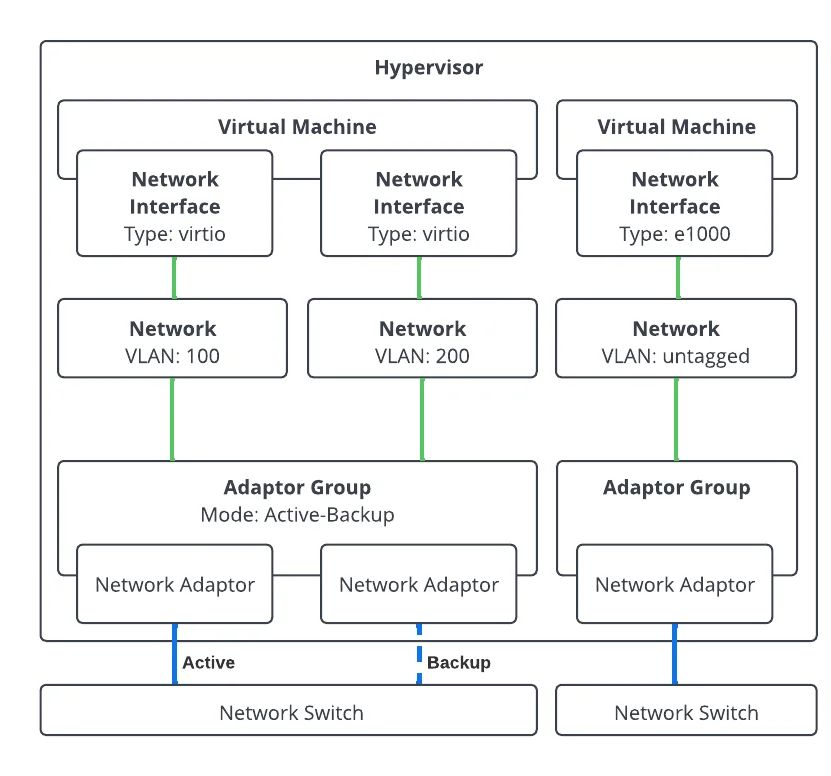
Network Interfaces
Network interfaces are the virtual network connections attached to your virtual machines. Each interface is configured with:
- A unique MAC address
- A connection to a defined network
- A hardware type derived from the Virtual Machine's hardware profile
Networks
A network in Gallium defines a logical network for virtual machine connectivity. Each network specifies:
- Adapter Group: How traffic flows between VMs and the physical network infrastructure.
- Settings: VLAN tag or untagged configuration.
Adapter Groups
An adapter group is a logical collection of network adapters that work together to provide external network connectivity. Each adapter group requires one or more network adapters and is configured with:
- Adapters: The physical network adapters assigned on each hypervisor.
Any Network Adapter within a group may become active. Your network topology must allow for traffic from any adapter to any other adapter within the same group.
Network Adapters
Network adapters are the physical network interface cards (NICs) installed in your server hardware. Each adapter can belong to only one adapter group.
Network Requirements
A Gallium Cluster requires a minimum of 4 network adapters per server:
- 2 for the infrastructure adapter group: carries cluster communication and storage traffic.
- 2 for a VM network adapter group: provides connectivity for your virtual machines.
The VM network adapter group can use 1 Gbps adapters if higher bandwidth is not required for your workloads.
Infrastructure Adapter Group
The infrastructure adapter group is a special adapter group that carries cluster communication and storage replication traffic between servers. It requires:
- At least 2 network adapters
- A minimum link speed of 10 Gbps
For evaluation purposes, it is possible to run a cluster with a single network adapter. This configuration is not supported for production use.
IP Addressing
Each hypervisor in the cluster requires a static management IP address. The cluster also requires a Virtual IP (VIP): a shared address that floats between cluster members and provides a stable endpoint for accessing the cluster regardless of which hypervisor is currently active. All management IPs and the VIP must be on the same subnet.
Plan for the following addresses before installation:
- 1 management IP per hypervisor (e.g.,
192.168.1.101/24,192.168.1.102/24,192.168.1.103/24) - 1 Virtual IP for the cluster (e.g.,
192.168.1.100)
Infrastructure traffic should connect to a dedicated, segregated management VLAN to isolate cluster communication from VM workload traffic. This should be presented as the native (untagged) VLAN to members of the infrastructure adapter group.