Distributed Storage
A Gallium Cluster distributes storage across all three servers to provide redundancy and high availability. Understanding the storage stack will help you plan your disk configuration before installation.
The distributed storage stack is built on four components:
- Virtual Disks: Storage volumes attached to your virtual machines.
- Virtual Disk Copies: Identical, synchronized copies of a virtual disk distributed across the cluster.
- Disk Pools: Logical groupings of physical drives where virtual disk copies are placed.
- Physical Disks: The storage devices installed in your server hardware.
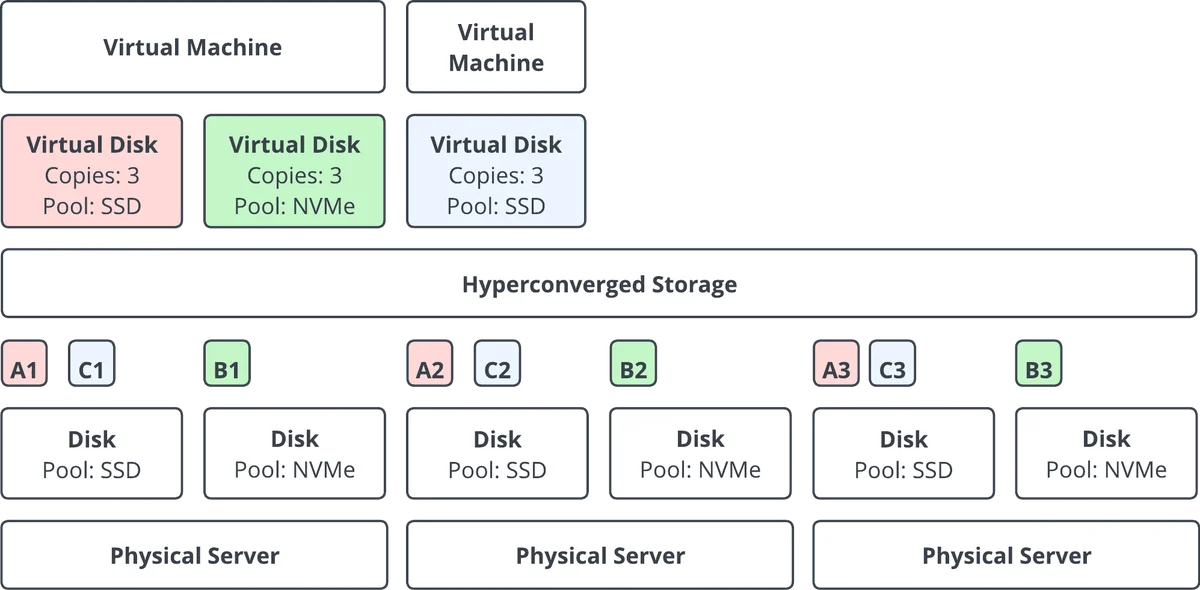
Virtual Disks
Virtual disks are the storage volumes attached to your virtual machines. When creating a virtual disk, you configure:
- Size: The storage capacity allocated to the VM.
- Disk Pool: Which pool the disk's copies are placed in.
The number of redundant copies is not set on the virtual disk. Instead, each disk pool has a Copy Count, and every virtual disk placed in the pool inherits that number of copies. To change how many copies a disk has, place it in a pool with a different Copy Count.
Virtual Disk Copies
Each virtual disk is stored as one or more identical, synchronized copies distributed across the cluster. Each copy resides on a single physical disk on a separate server. Copies are never striped or shared across multiple physical disks.
This means the maximum size of a virtual disk is determined by the available space on individual physical disks. A virtual disk in a 3-copy pool requires enough free space on a single physical disk on each of the 3 servers to hold the full copy.
For example, if each of your three servers has two data disks (one with 700 GB free and one with 800 GB free), the largest virtual disk you can create in a 3-copy pool is 800 GB, not 1.5 TB. Each copy needs a single disk on a separate server that can hold it, and the 800 GB disks are the largest available on each server.
Disk Pools
A disk pool is a logical grouping of physical disks that defines where virtual disk copies are placed. Pools allow you to group drives for tiering or application-specific use: for example, separating fast NVMe storage from higher-capacity HDD storage.
- Each pool has a Copy Count (1, 2, or 3), set when the pool is created and fixed thereafter. This is the number of copies every virtual disk in the pool is provisioned with.
- A pool needs disks on at least as many servers as its Copy Count: a 3-copy pool needs disks on 3 servers.
- All disks within a pool should be of the same type (e.g., all SSD or all NVMe). This is recommended but not enforced.
- Identical disk sizes are recommended but not required.
- Each physical disk can belong to only one pool.
- A System Pool is automatically created on each server's installation disk during installation.
See Disk Pools for full details on creating and managing pools.
Physical Disks
Physical disks are the storage devices (SSDs, HDDs, NVMe drives) installed in your server hardware. Each disk can belong to only one disk pool.
Performance
Single Virtual Disk Performance
A virtual disk's performance is bounded by the cost of replicating every write synchronously to each of its copies before the I/O is acknowledged. Latency, IOPS, and throughput therefore reflect coordinated operations across the cluster rather than the raw capability of a single SSD.
The figures below are typical for a 3-copy virtual disk backed by Micron 9300 NVMe SSDs. They are intended as a reference point for capacity planning; actual results vary with SSD model, replica count, network speed, CPU, and workload characteristics.
Typical single virtual disk performance: 3 copies, Micron 9300 NVMe SSDs
| Metric | Read | Write |
|---|---|---|
| Random 4 KiB IOPS (QD=128, 8 jobs) | ~25,700 | ~24,800 |
| Sequential throughput, 128 KiB (QD=16, 4 jobs) | 1,470 MiB/s | 330 MiB/s |
| Latency at QD=1, 4 KiB | ~500 µs | ~350 µs |
These figures describe a single virtual disk, not the cluster aggregate. A VM with multiple virtual disks, or a host running multiple VMs, will exceed these figures in total, but no individual virtual disk will exceed them without a change to replica count, SSD model, or network. Workloads that demand higher per-volume performance generally benefit most from splitting I/O across multiple virtual disks.
If you have a workload that requires higher single virtual disk performance, contact Gallium support to discuss available options.
Network
Maximum cumulative storage performance across the cluster is limited by the speed of the infrastructure network.